
Get faster withJRC Trackside.
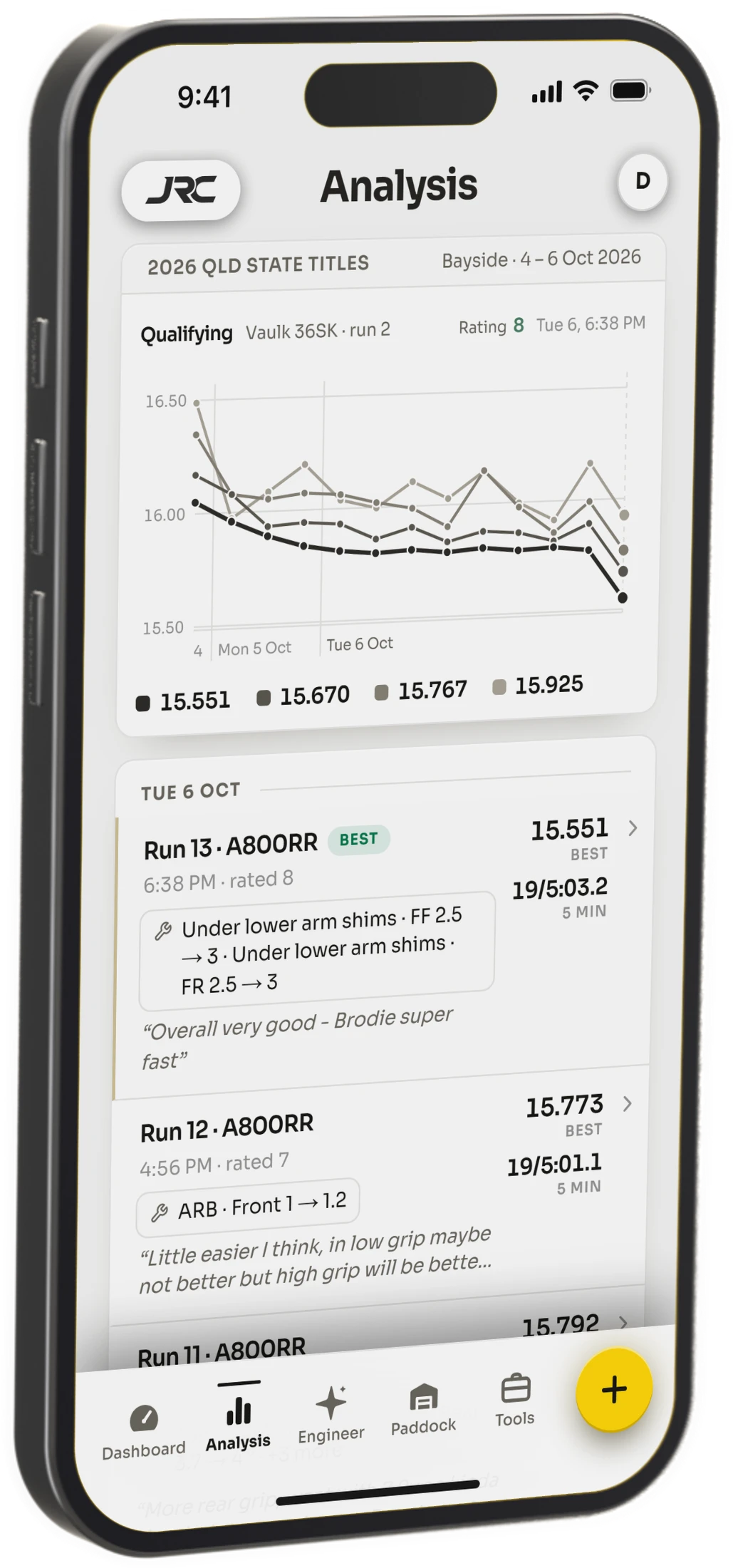
Trackside logs every run, setup and lap time. Its Engineer tells you what to change next.

Are you the driver who…
- Changes three things, learns nothing?
- Forgets what was fast here last time?
- Doesn’t know what to change next?
- Is stuck on the same lap time?
- Keeps fighting the same understeer?
- Second-guesses the setup on race day?
- Goes home not knowing what worked?
- Watches the same drivers pull away?
Don’t let another test day go to waste.
Start getting fasterEasy enough that you’ll actually use it.
Between runs there’s a battery to change, tyres to check and someone talking at you. Notes lose, every time. So the day ends with a fast run you can’t explain and a slow one you can’t rule out.
- 01One tap brings back your last run’s car, meeting, tyres and setup
- 02The weather logs itself, and the setup sheet is already filled in
- 03Lap times attach themselves when timing posts
- 04Say what the car did, in the words you’d use on the rostrum


Ask it anything.
It already has your runs, changes and lap times — so ask the way you’d ask the guru at the track.
Understand the real picture, stop guessing.
Every run on one chart. Open the fastest and see exactly what changed on the car, on your own setup sheet. No more “I think that helped.”
Teams that work together best, win.
Put your team’s runs in one place — when everyone works together, the right direction becomes obvious.
- —Create a team, add whoever you travel with
- —Their runs land beside yours — same car, same track, same day
- —Shared inside the team. Nothing leaves it.
Privacy
Your data stays yours.
- Other driversNever see your runs, setups or notes.
- Your teammatesSee only the runs you share.
- JRC DynamicsNobody here looks at them either.
See what you’re getting into before you have to pay.
Experience what it’ll be like six months down the track, once you’ve tracked every lap. Experience a driver’s season with our demo.
The notebook, or the race engineer.
Both keep every run, every setup and every lap time. Race Engineer adds the Engineer itself, and the heavy tools.
Notebook
The smart race notebook.
$8.33AUD / month
Free for 30 days, then billed yearly
Try Notebook free- Unlimited run logging
- Session review: pace, consistency, mistakes
- Compare runs and setups
- Laps from LiveRC and Speedhive
- One team
- Not included: The Engineer
- Not included: Laptime Analysis
- Not included: Roll-centre and geometry
Race Engineer
The full race engineer.
$16.66AUD / month
Free for 30 days, then billed yearly
Try Race Engineer free- The Engineer: 60 questions a month, 20 in the free trial
- Everything in Notebook
- A whole race weekend’s questions in one day
- Laptime Analysis: any race, any driver
- Roll-centre and geometry tools
- Any number of teams
- Remaining-this-month meter
Launch seat
Race Engineer, for the life of the app.
One payment, nothing renews. No change-of-mind refunds. Not sure? Try Race Engineer free for 30 days first. Terms
AUD, once
Get a launch seatOr pay once · until 31 October
| What you get | Notebook | Race Engineer |
|---|---|---|
| Runs kept | All | All |
| Run logging (LiveRC · Speedhive) | ||
| Session review | ||
| Compare runs & setups | ||
| Teams | One | Any number |
| Laptime Analysis · any race | — | |
| The Engineer | — | 60 a month |
| Ask a weekend’s worth in one day | — | |
| Roll-centre tools | — |
- One payment, nothing renews
- Free for 30 days, cancel anytime
- An email a week before you pay
- Your sign-in code arrives by email
Questions drivers ask
Getting the app
How do I get the app?
On iPhone or iPad, download JRC Trackside from the App Store. On Android, a laptop or a tablet, use the web app: go to jrcdynamics.com and sign in. It’s the same app in your browser, and you can add it to your home screen so it opens like any other app.
I’m in Europe. Why can’t I find it on the App Store?
The iPhone app isn’t on the App Store in EU countries yet. Apple has extra paperwork for selling there, and it isn’t finished yet. Until then, use the web app at jrcdynamics.com. It has every feature, on your phone and your laptop.
Is there an Android app?
Not in Google Play yet. On Android, open jrcdynamics.com in Chrome and sign in. Then tap the ⋮ menu and choose Add to Home screen. It opens full screen, like any other app.
Can I use it on my phone and my laptop?
Yes. Sign in with the same email on each. A run you log on your phone at the track is on your laptop when you get home.
Can I try it before I sign up?
Yes. Open the demo: a driver’s whole season, already logged. No account needed.
Setup sheets
Why can’t it read my setup sheet?
The app has to learn each car’s sheet box by box, so it knows which box is the front spring and which is the rear toe. That takes time. We’re working through the cars as fast as we can, starting with the ones drivers use most. If it can’t read your sheet yet, it will soon. You can keep logging runs on that car meanwhile, and you can email support@jrcdynamics.com to move your car up the list.
Can I upload a photo or a scan of my sheet?
No. The app reads the fillable PDF: the one you can type into on a computer. A photo can’t be read reliably, and one misread number means wrong advice.
Where do I get the fillable PDF?
From your car maker’s website, usually on the car’s page or its downloads page. Makers often post two versions; pick the one with “editable” or “fillable” in the name. Open it and try typing in a box. If you can, it’s the right one.
My car isn’t in the list. What do I do?
When you add the car, choose “My chassis isn’t listed” and upload its fillable setup sheet. No sheet? You can add the car without one and keep logging runs. Email support@jrcdynamics.com if you get stuck.
Lap times
Where do my lap times come from?
From your club’s timing results on LiveRC or MyLaps Speedhive. Pick the session and the laps attach to the run. For MyRCM, download the results PDF from MyRCM and add it to the run. You can also type the laps in yourself.
Do I need any extra hardware?
No. Lap times come from your club’s timing system and the transponder you already race with. Your phone is all you need.
The Engineer
What is the Engineer?
An AI race engineer that has read every run you’ve logged: your setups, the changes you made, your lap times and what you said the car did. Ask it what to change next, or why the last change didn’t work, the way you’d ask the fast guy in the pits.
How many Engineer questions do I get?
Race Engineer gives you 60 questions a month, and 20 during the free trial. Each question counts for 30 days from when you asked it. The meter shows how many you have left.
Does it work for my class?
Yes. It’s built for competitive RC racing at any scale: touring car, buggy, truggy, stadium truck, short course, pan car and F1, nitro and electric.
Plans and paying
How does the free trial work?
Both plans are free for 30 days, and Race Engineer comes with 20 Engineer questions in that time. We take a card to start. We email you a week before the first payment, and you can cancel any time before then and pay nothing.
Why do you need my card for a free trial?
So your plan carries on without a gap if you keep it. Nothing is charged for 30 days, and we email you a week before the first payment.
Can I pay in the iPhone app?
No. Plans are bought on our website. Then sign in to the iPhone app with the same email and everything is there.
How do I cancel?
Tap your account, then Subscription, and cancel there. Your plan keeps running until the end of the time you’ve paid for.
Can I get a refund?
Yes. A paid plan gets a full refund in its first 14 days: email support@jrcdynamics.com. Launch seats are the exception: no change-of-mind refunds.
Your data
Can other drivers see my setups?
No. Your runs, setups and notes are private to you. They’re only shared with a team, and only after you accept the team’s invite.
What happens to my data when I ask the Engineer?
To answer, your runs, setups, notes and lap times go to our AI provider, OpenAI. Your email and account details are never sent. We don’t sell your data to anyone.
How do I delete my account?
Settings, then Delete account. It removes your account, runs, setups and uploads, and cancels your plan. It can’t be undone.
Everything else
Can I see °F and mph?
Yes. In Settings, switch units to °F · mph. Temperature and wind change everywhere in the app.
Is it in my language?
English only for now.
How do I get help, or suggest something?
Email support@jrcdynamics.com, or use Send feedback in the app’s account menu. Every message is read.